Fleet
The tunnel
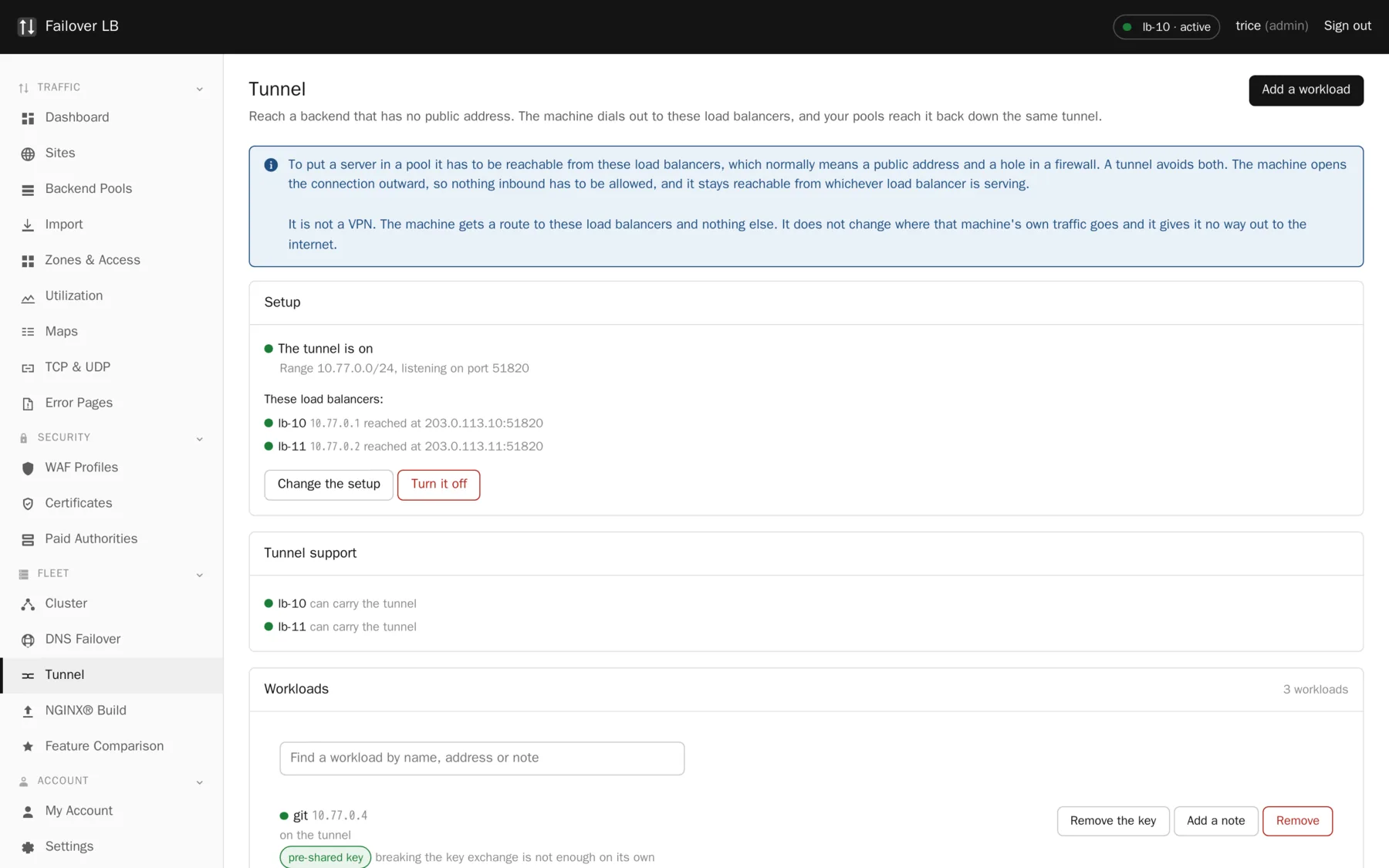
To put a server behind these load balancers, they have to be able to reach it. That normally means a public address and a hole in a firewall, and arranging both is often the longest part of the job.
What it does
The machine you want to reach opens a connection outward to the load balancers, and they reach it back down the same connection. Nothing inbound has to be allowed, and the machine needs no public address of its own.
It is not a VPN, and the difference matters
The machine gets a route to these load balancers and to nothing else. It does not change where that machine's own traffic goes, and it gives it no way out to the internet. A tunnel that did those things would be a much bigger decision than this one.
When to use it
- A web server in an office, with no public address.
- A data center that will not give you public addresses for every machine, or charges for them.
- A backend you would rather was not reachable from the internet at all, even through a firewall rule.
- Somewhere you want to move a service between networks without changing anything on the load balancers.
If a backend already has an address the load balancers can reach, you do not need this. Add it to a pool in the ordinary way.
Turning it on
- Choose an address range. The suggestion is
10.77.0.0/24, which is fine unless something on your network already uses it. - Leave the listening port at 51820 unless you have a reason to change it. Whatever you choose has to be reachable outbound from wherever your workloads are.
- Tick it on and save.
You choose the range rather than the system choosing it, because you are the only one who knows what is already in use on your network. A range that clashes with something else does not fail loudly. It quietly makes one of the two unreachable.
The range cannot be changed later
Changing it would strand every enrolled workload, so the page refuses once any are on it. Remove the workloads first if you really need a different range.
Installing tunnel support
The tunnel needs a package on each load balancer, and it is not installed until you switch the tunnel on. Installing a network package on somebody's production load balancers because a page was open is not a decision this system makes on its own.
It installs on every load balancer, not only the one you are looking at. A workload connects to all of them so that it survives one going away, and a node that cannot carry the tunnel is a failover that will not work when you need it.
Adding a workload
Adding a workload reserves an address and gives you one command to run on the machine. Nothing happens on that machine until you run it.
curl -sSL https://lb-01.example.com/lb/tunnel/enrol/7f3c1a9e2b8d4c6f | sudo bashThe command works once and expires after two hours. Treat it like a password while it is alive: anybody who has it can put a machine on your tunnel. Only a hash of it is kept, so the exact command cannot be shown again, but you can always get a fresh one from the workload list.
What the command actually does
Worth knowing before you pipe anything into a shell. The script is short and deliberately readable, and you can look at it first by leaving off the last part of the command.
- Installs WireGuard if the machine does not have it.
- Makes a key pair on the machine, and sends only the public half back.
- Writes one network interface, called
nfm0. - Adds a route to the load balancers, and to nothing else.
- Leaves behind a small helper command for checking and undoing it.
What it does not do is as important: it does not change the machine's default route, it does not send that machine's own traffic anywhere, and it does not open any inbound port.
When it finishes, it waits for the tunnel to come up and tells you whether it did. An interface that exists and a tunnel that works are not the same thing, and the difference is usually a firewall that drops outbound UDP on the tunnel port. Better to find that out there than from a backend marked down later.
Putting it behind a site
Once a workload is on the tunnel it has an address, shown next to its name. From there it behaves like any other backend: add it to a pool with the port the service listens on, and apply. Health checks run over the tunnel like any other check.
Use the port the service really listens on
A pool whose other members are on port 82 does not oblige a tunneled member to be on port 82. The tunnel address is a normal address and the port is whatever that machine uses.
Removing a workload
Removing has two halves and only one of them happens in the GUI. Taking the workload out here stops the load balancers talking to it straight away. The machine keeps its interface, its config and its key until somebody clears them, and the page gives you the command to do that. It deliberately leaves the WireGuard package installed, because that machine may be using it for something else.
When it does not work
| Symptom | Usual cause |
|---|---|
| Enrolled, but the backend is down | The tunnel is up and the service behind it is not. Check the service is listening, on the port you put in the pool. |
| Nothing happens at all | Run sudo nfm-tunnel status. Usually a container whose kernel has no WireGuard, or a firewall that allows outbound traffic generally and drops the tunnel port, which is UDP. |
| Works through one load balancer and not the other | The workload cannot reach one of them. Often an address family problem, such as a load balancer published on IPv6 only while the workload has IPv4 only. A name with both an A and an AAAA record is the most flexible. |
| The command expired | Click Show the command for a fresh one. Asking for a new one retires the old one immediately. |
Nobody else has this
On the comparison page this is one of only two rows where all three competitors score zero. Neither nginx nor NGINX Plus does anything like it, and neither appliance does either. They all assume the backend is already reachable.
Common questions
Does the tunnel carry my visitors' traffic?
It carries the hop from the load balancer to that backend. Visitors reach the load balancer over the public internet exactly as before.
What happens if a load balancer goes away?
The workload is connected to all of them, so the surviving one keeps reaching it. That is why tunnel support installs fleet wide rather than on one node.
Can a workload be behind carrier grade NAT?
Yes. It only needs to be able to make an outbound UDP connection.
Is the traffic encrypted?
Yes, it is WireGuard. Whether you also want TLS on top depends on how much you trust the machines at both ends.
Step by step instructions
The how to section has searchable, task shaped answers. Search it for tunnel.
Related features
Backend pools
The list of servers behind a site, and how traffic is shared.
Read moreActive health checks
Probe every backend on a schedule and pull the dead ones out.
Read moreBackend trust tokens
Prove to your own servers that a request came from the fleet.
Read moreClustering
Every node holds the whole config. No central controller.
Read more